Your appointments can’t live in WhatsApp
Nicho Reservas gives you a booking page with your brand: clients pick a service, a day and a time from their phone, reminders go out by themselves, and you see your calendar, your team and your numbers in one place. Free to start.
Free forever · No card · Pro $2.99 · Max $9.99 a month
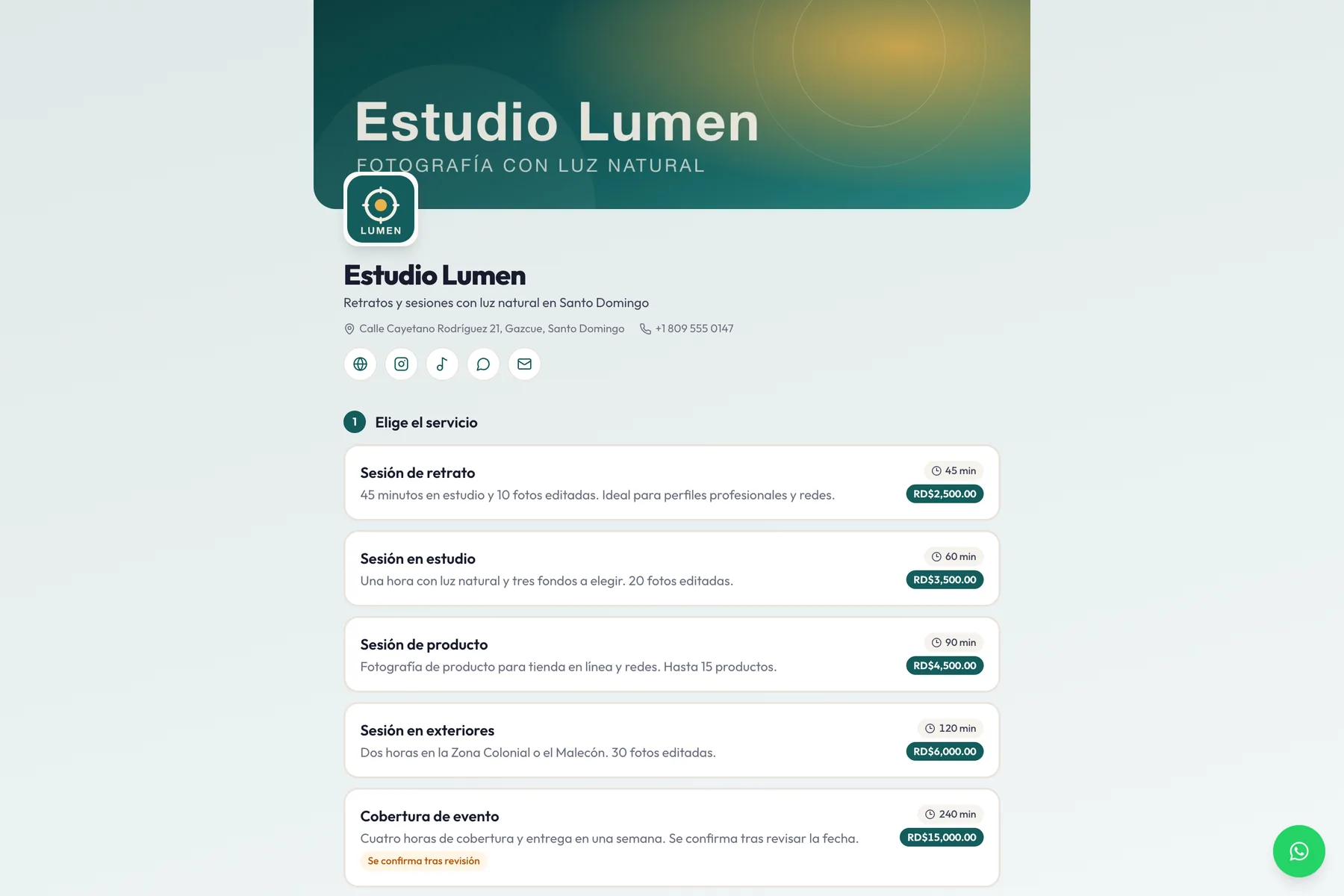
What eats your time (and how we fix it)
Pick the problem that hurts most and see the feature that fixes it, as it looks inside the app.
Your booking page, open 24 hours
Share a link — or the QR at the counter — and the client picks a service, a day and a time from their phone, no account needed. You find out by email and in the panel bell. If you prefer to approve each booking first, it stays “pending” until you say yes.
Watch the 1-minute tutorial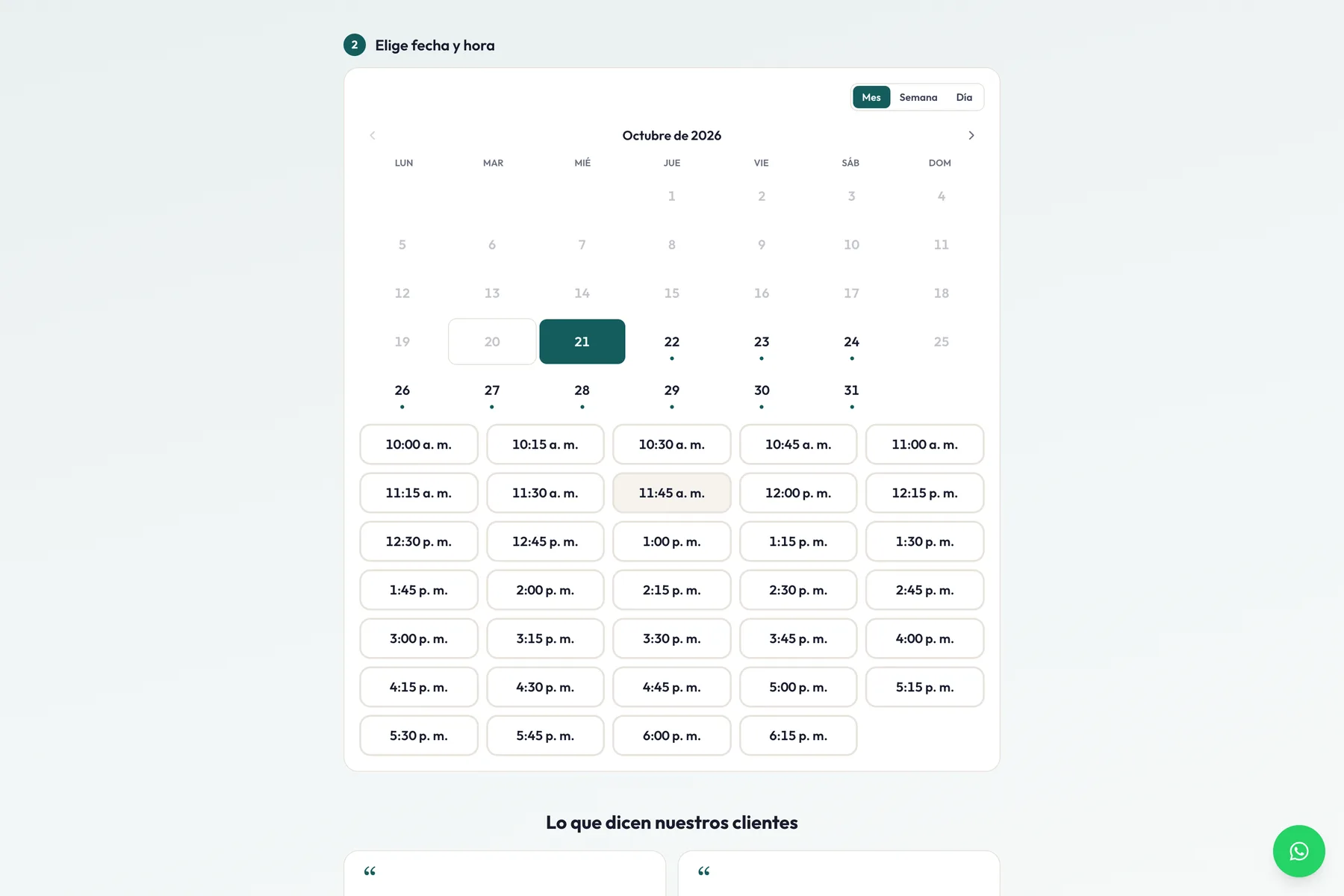
One app. Your whole calendar.
What used to be spread across WhatsApp, a notebook and your memory is now together, in your language.
Your page, with your brand
- Modern templates: columns, carousel, video, testimonials and brands
- Calendar by month, week or day; the client chooses
- Your logo, your cover, your colour and your WhatsApp
- In Spanish and English, with your brand card when the link is shared
From “message me on WhatsApp” to “book on my page”
Four steps. The first takes five minutes; the other three happen by themselves.
Set up your page
Services, hours, logo and cover. Pick a template and adjust it to taste.
Share your link
On Instagram, in your WhatsApp status, on Google or with the QR at the counter.
They book themselves
They pick a time from their phone and get the confirmation and reminders without you doing anything.
You show up
In Today you mark who came. Afterwards, the review or testimonial is requested by itself.
Watch a booking come in by itself
Someone books from their phone. The appointment lands on your calendar, they get the confirmation and the reminder, and you only mark whether they came.
No double bookings
The lock lives in the database, not on the screen.
Reminders at 24 h and 1 h
With a button to save the appointment to the phone.
Reschedule without a fight
Drag it, or set whatever time you want.
Every client’s history
Came, skipped, cancelled: you see it before accepting.
Today · Thursday
0 Bookings this month
Sesión de producto · Diego B.
free
Sesión en estudio · Lucía F.
Sesión de retrato · Pedro L.
Ask your numbers like you’d ask a partner
The analyst knows your calendar, your clients and your services. It answers with real figures from your business and suggests what to do. Included in Pro and Max.
- Which days and hours you fill most
- Who tends to skip and what to do about it
- Which service is growing and which is cooling
- Your week summarised in your inbox every Monday
8 tutorials of about a minute each
Every step has its short video, in Spanish, with the real app. No endless courses.
Start free. Grow when your calendar grows.
No card to start and no charge per team member. All three plans include the page, the booking engine, reminders and testimonials.
free
To try with your real business, with no expiry date.
Free forever
- 1 booking page with your brand
- 1 custom form
- 10 bookings per month
- Reminders, client calendar and Google reviews
- Daily panel with arrived / no-show
pro
For the business that already lives off its agenda.
$2.99/mo
- 3 pages and 3 forms
- 100 bookings per month
- Waitlist with auto-refill
- Documents uploaded before the appointment
- AI analyst chat (50 credits/mo)
max
For teams and classes: what no other plan has.
$9.99/mo
- Unlimited pages, forms and bookings
- Group bookings with capacity per slot
- Several appointments at the same time, auto-assigned
- Clients pick their professional and see their agenda
- No “Powered by” · 500 AI credits/mo
Pricing never charges per seat: on Max, your whole team fits in the same $9.99. The booking quota resets monthly and cancelling a booking doesn’t refund it — so nobody games the counter.
What people ask before starting
Your next booking could be coming in by itself.
Create your page in five minutes, put the link on your Instagram and let the calendar fill while you work.
Free forever · No card · Cancel anytime